Jim's Blog

Hello and welcome to my blog. This blog will be used primarily (or rather ONLY) for posting research and work I've done for I-media. So yeah...knock yourself out.

Saturday, June 5

Giving my video a dramatic effect.

To give my video a dramatic effect I decided to take a slightly different route with my editing and also with the addition of sound effects. Rather than building up momentum through different shots and fast paced editing (although I have still used fast paced editing for the most part), I have changed the style however, at the same time kept the quick shots.

So firstly I had to search for sound effects, which was easy enough as I have Soundtrack Pro available to myself and through using the software I was able to find a Heartbeat sound effect that I applied to a few of my shots in order to give them an over dramatic feel. These shots that have the Heartbeat sound will have a black and white filter for emphasis.

Labels: , ,

Update on Sketchbook (ideas etc.)

In my Sketchbook I currently have my storyboards and am working on placing my visual plan inside. I have had trouble filling up my Sketchbook so far but I am very happy with my ideas at them moment and despite my storyboard and visual plan there are still likely to be some changes and additions to the final production of my video.

Labels: , ,

Friday, June 4

Trailers, a great example of professional Video Editing.

Video Editing is used in many areas of video one of them being Trailers. Now Trailers can be used for a variety of things such as short movies etc but are generally known for film previews. The reason that they're a great example of video editing is because they need to attract and draw in people to a particular movie. In other words it's a form of advertisement for a particular film. Due to a Trailer's purpose as stated above, effective and professional editing of clips taken from a movie is necessary for the purpose to be fulfilled (Drawing in people, hype etc).

Here is an example of a excellent film Trailer:


Now this trailer uses various techniques by the looks of things but does an especially good job at building momentum and giving the viewer a rough idea of the story. The trailer uses it's own graphics to accompany it for example the spinning gears with yellow text (this helps promote the film).

The music is also great with a fantastic choice of soundtrack, which is edited really well with the film clips and this results in great timing to emphasize certain scenes and help build momentum.

Labels: , ,

Saturday, May 22

Visual Plan of my video shooting. - Fishing.

With help from my brother I completed a rough visual plan of how my video will go. This includes the start middle and end of my video.

Beginning -


 1.


2.


3.


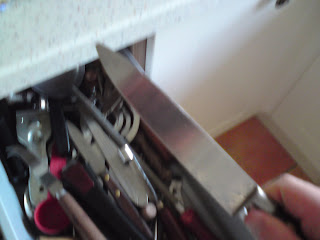
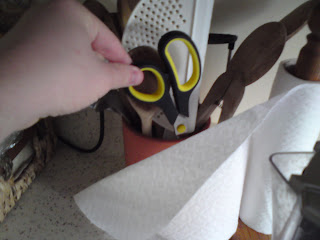
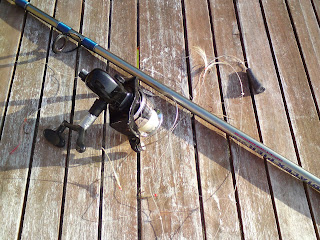
The beginning set of shots consist of gathering the equipment and then placing them together. So for example pictures 1 and 2 consist of gathering tools such as Scissors and a Knife, then picture 3 consists of putting my fishing rod together, which includes the reel onto the main body and then attaching the feathers to the fishing line. 

Middle - 


4.


5.
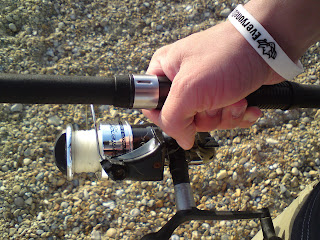


6.
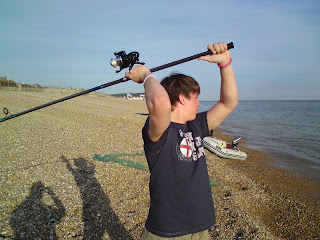

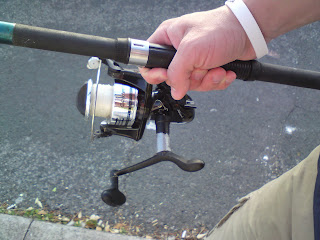
The middle consists of making my way to the beach and the start of throwing the line into the sea. So in picture 4 there is a quick shot of leaving my house and heading towards the beach. To emphasize this there will be a close up shot on a hand holding the rod, which will move naturally as hands do when walking and I plan on including heavy breathing sounds for exaggeration (as if I was out of breath or in a rush). This will then cut quickly to the next shot (picture 5), which will be me walking on the beach, meaning I have skipped the majority of the journey. The shot style will be the same as the previous one except for I will have loud pebble crunching sounds, which are made simply by walking on the pebbles.


End - 


7.
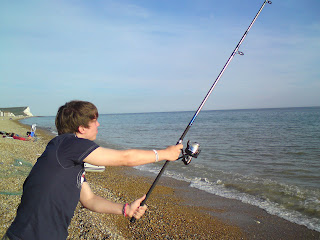


8.
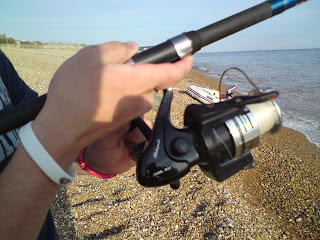


9.


The ending part kicks off where the middle finished and will likely have something to do with throwing in the line so in a sense the end of the middle is the start of the end. I will have a closeup shot of reeling in the line and exaggerate this with some loud screeching reeling sound. If I am successful in catching fish, which I hope to be, as the fish is/are about to come out the water I will give the line a bit of the tug so when they burst out of the water they'll be temporarily in the air at which point I will for a second or two, slow down the video. Then instantly after the video speed will return back to normal.

However, picture 9 is not the absolute ending but rather just the end of my plan using pictures. After shot 9 I will do a couple of quick shots unhooking the fish then one more shot holding the fish up and as I pretend to take they're heads off using a knife, the video will end.

Alternate middle shot - 


(4/5).


This picture represents an alternate middle shot. This means instead of having a closeup on the hand holding the rod, I film my journey like this but in sections. In other words I would walk some, cut the video then reappear further towards the beach. Almost as if I were teleporting there. However, I'm unlikely to follow this path and am probably going to just stick with my first idea.

Labels: , ,

Friday, May 21

Planning my shooting.

It is extremely important that I plan my filming. Not just because it should be done anyway but because I'm hoping that I will catch something, which if I do will decide how my video will end.

For example:

If I catch a fish I will have a pretend ending where it will appear like I'm about to cut the fish heads off and as I'm about to it will go black.

If I don't catch a fish then I will simply film the feathers/hooks dragging out of the sea with nothing on them. (This would be a close-up shot). - This is my backup plan.

But the problem with my first option is that the weather must be perfect as in sunny and without too much wind. If not I will have quite a lot of trouble filming and worse I will have a lot of trouble fishing.

Labels: , ,

Saturday, May 15

An example of fast paced editing.

This is a video I found while broswing through Youtube on the subject of 'Fast paced editing'. Surprisingly, there isn't lots and lots on the subject but some videos are available. The video I have picked isn't particularly interesting but it's fairly similar to what would be found in our projects.


Despite the video not being very ambitious, I think the guy did a good job of fast paced editing as there are barely any shots that are longer than a second. Of course our videos will not be as long and will hopefully be a bit more creative than this.

Labels: , ,

Sunday, May 9

My ideas so far.

I have thought of a couple of ideas for my project except for the obvious choices for example cooking etc.
So far I have come up with two main ideas that I could potentially use for this project. These are:

My first idea:

Fishing - I have a fishing rod that I can use and it seems that for this project it could be quite a good idea. I've roughly planned in my head how the video would go (through storyboard) and here is an example:

Placing the parts of my fishing rod together - Making my way down to the beach - Throwing the the feathers into the water - Reeling in - Unhooking the fish - Pick fish up, then pretend to cut the head(s) (It ends before anything can be seen despite not actually killing them).

My second idea:

Exercise - At home I have a small bench (a bench is used for lifting weights and doing various exercises). I haven't thought about this quite as much as my previous idea because it is much more appealing to me than this one.

However, if I were to do this I think it would consist of me filming myself doing different exercises and then placing them together with fast editing so it appears I have done lots and lots. For the ending I would likely film myself collapsing on a chair with exhaustion.

Labels: , ,

Crash, Bang, Wallop. New Brief.

Now that the deadline has passed for the 'Treasure Island Toys' project we have been handed a new brief called "Crash, Bang, Wallop". This new brief will shift our focus back to using a camera (but for video shooting this time) and will also provide us with knowledge on video editing or to be more specific the use of Final Cut Pro although I am already familiar with the basics of the program.

In this new brief we must take something we do in everyday life, film and then edit the shots in Final Cut Pro in order to create an effect of exaggeration. To do this we must used fast paced editing, with no less than 20 edits allowed. However, it has been advised to use 25-30 edits+ in order to really emphasize the exaggeration we're trying to accomplish with the video shooting and the editing.

Aside from Final Cut we are able to use other pieces of Software for example Soundtrack Pro to edit any sound effects we would like placed in our video. However, any additional content we place into our videos must be copyright free.

The video must be between 15-20 seconds long and no more or no less.

Software:


Labels: , ,